
Features
Time series
Model values that change over time, such as prices, demand, or rates, and simulate their paths.
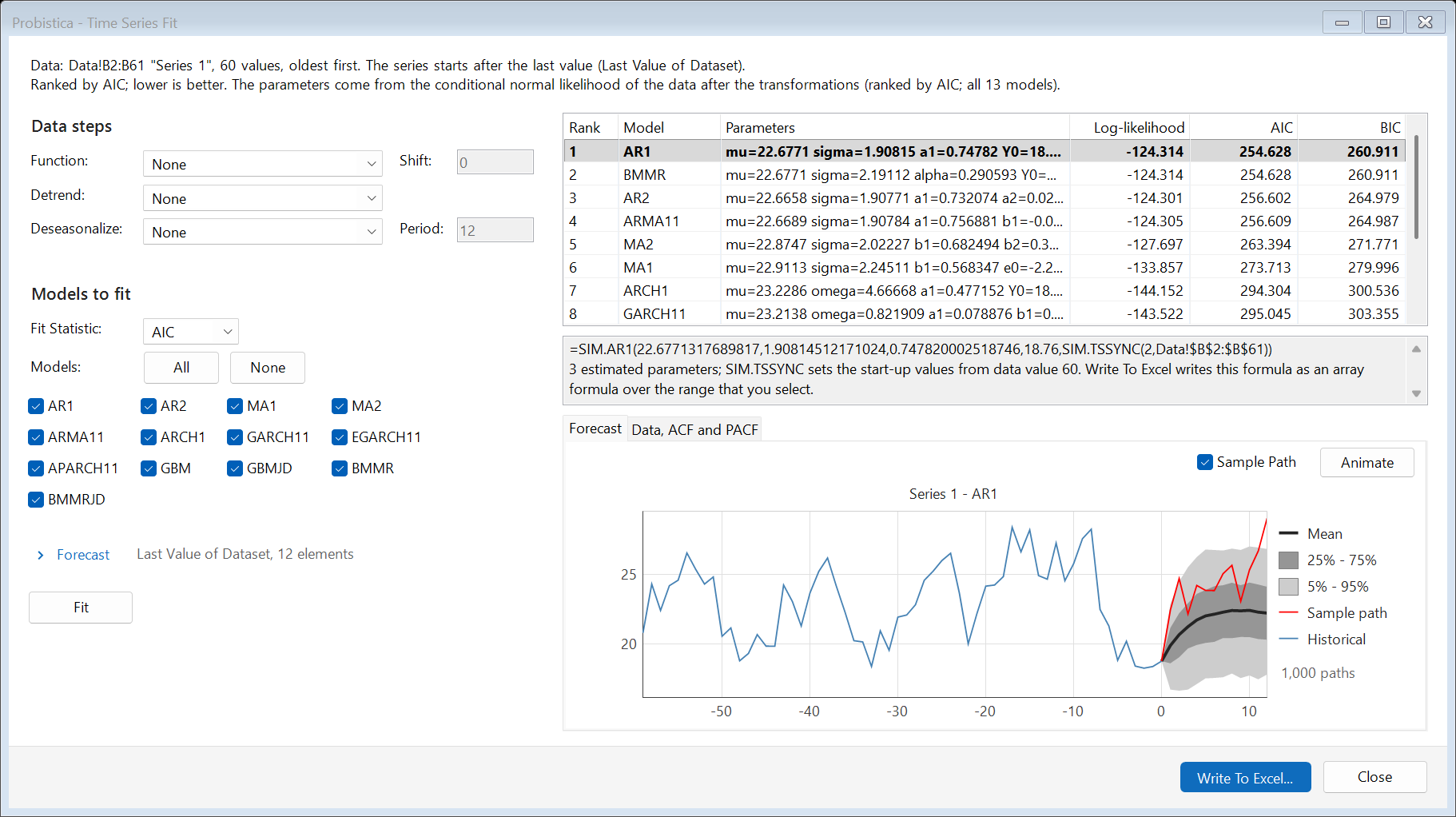
Fit a time-series model to your data
Select a data series and click Time Series Fit. Probistica fits 13 models and ranks them by AIC or BIC. The forecast chart shows the history, the mean path, and the 25-75% and 5-95% bands.
- Models: AR1, AR2, MA1, MA2, ARMA11, ARCH1, GARCH11, EGARCH11, APARCH11, GBM, GBM with jumps, BMMR, and BMMR with jumps.
- Data steps: transform, detrend, and deseasonalize before the fit.
- Start the forecast from the last value of the data.
- Time Series Batch Fit fits many series at one time.
Time-series functions in cells
Select a range of one column or one row, type the function, for example =SIM.AR1(100,40,0.8,490), and press Ctrl+Shift+Enter. Each cell is one period. Properties add transforms, integration, and seasonality. Time series can be correlated.
Limits of this release: the fit has no automatic detection, and some properties do not work on a series. The user guide lists them.